
No products in the cart.
TL;DR: SIMAGIC’s 2026 launch introduces eight tightly integrated products that together form an upgraded ecosystem called UP+. The lineup adds wireless connectivity (Air Link), a new touchscreen telemetry dashboard (MagicDash 4), magnetic mounting and quick-disconnect accessories (MagDock, Maglink Pro, Maglink Pro Xtend), and three new Zeus-series steering wheels (Formula, GT, Sport). This guide explains what each product does, who it’s for, what you need to buy to use it, and exactly how to set it up.

Table of Contents
Update June 2026 · Official SIMAGIC Bulletin
SIMAGIC Adjusts Zeus Series Bundles: Air Link Now Included Free, Official Pricing Confirmed
What changed: Following customer feedback about the original Zeus Series launch, SIMAGIC has issued an official update revising what ships in the box. The most significant change for new buyers: the SIMAGIC Air Link wireless adapter is now included at no extra cost in every Zeus Series steering wheel bundle and with every standalone MagicDash 4 purchase. There is also a free compatibility-accessory offer for existing Alpha wheelbase owners, valid for 90 days from launch.
1. Air Link Now Included in All Bundles — No Separate Purchase Required
When the 2026 lineup first launched, the SIMAGIC Air Link wireless adapter was sold as a standalone accessory. SIMAGIC has now bundled it directly into every Zeus Series steering wheel package and every MagicDash 4 purchase, shipped together at no additional cost. If you order any of the bundles below, you do not need to add Air Link to your cart separately.
2. Confirmed Bundle Pricing (USD)
Purchase Bundle Configuration Bundle Price Zeus Series Steering Wheel + MagicDash 4 Bundle Zeus Formula + MagicDash 4 $669 Zeus GT + MagicDash 4 $509 Zeus Sport + MagicDash 4 $469 MagicDash 4 (standalone) MagicDash 4 $199 All four prices above now include the SIMAGIC Air Link, shipped together with the product. Pricing is per SIMAGIC’s official bulletin and may vary by region or distributor.
3. Free Compatibility Accessory for Existing Alpha Wheelbase Owners
If you already own a SIMAGIC Alpha-series wheelbase (Alpha, Alpha Mini, Alpha U, or M10) and you purchased a Zeus Series steering wheel or a MagicDash 4 within 90 days of launch (the cutoff is August 30, 2026), you are eligible to receive a complimentary compatibility accessory at no charge. SIMAGIC will provide either:
- A Maglink Pro — the magnetic quick-disconnect cable + hub kit that adapts your existing quick release to work with the new Zeus wheels, or
- A MagDock — the cockpit-mounted magnetic screen stand that includes a built-in Maglink Pro hub for mounting MagicDash 4 at cockpit level.
How to claim: Contact SIMAGIC support with the following documentation:
- Proof of purchase of your Alpha series wheelbase
- The wheelbase’s serial number (the 10- or 14-digit S/N printed on the product and packaging)
- Your warranty card
SIMAGIC will handle the rest. Reach out via [email protected] or through your authorized regional distributor.
4. What This Means for Buyers
- New Zeus or MagicDash 4 buyer (any wheelbase): You no longer need to add the Air Link to your order — it ships free in the bundle.
- New Zeus owner on an Alpha EVO base: The Air Link is now included even though Alpha EVO offers a native wired connection — useful if you later move to a different cockpit setup or want a cleaner wireless install.
- New Zeus owner on Alpha / Alpha Mini / Alpha U / M10: Within the 90-day window, you can also receive a free Maglink Pro or MagDock to complete the wheel-to-base connection. Combined with the now-included Air Link, this effectively gives you the full UP+ wireless ecosystem with no add-on purchases for the first three months after launch.
- Existing wired Zeus rig builders: The free accessory offer applies to recent purchases too — if you bought a Zeus wheel or MagicDash 4 within the past 90 days, you are eligible.
Sourcing note: The information in this update is from SIMAGIC’s official customer bulletin titled “Zeus Series Update.” Bundle pricing, included accessories, and the existing-customer compatibility program are subject to change — always confirm the current offer with SIMAGIC’s official store or your authorized regional distributor before purchase.
Introduction: What’s New From SIMAGIC in 2026
SIMAGIC just dropped one of the biggest single-day launches in direct-drive sim racing: eight new products that together form an upgraded ecosystem the brand calls UP+. The lineup spans wireless connectivity (SIMAGIC Air Link), telemetry hardware (MagicDash 4), magnetic mounting and charging accessories (MagDock, Maglink Pro, Maglink Pro Xtend), and three new Zeus-series steering wheels (Zeus Formula, Zeus GT, and Zeus Sport).
If you race on a SIMAGIC Alpha EVO wheelbase — or any of the legacy Alpha, Alpha Mini, Alpha U, or M10 wheelbases — these products are designed to plug into your existing rig, eliminate cable clutter, and give you a true plug-and-play wheel-swap experience similar to real motorsport. This guide walks through each product individually: what it does, who it’s for, what you need to buy to use it, how to set it up, and the spec sheet you need before you click “Add to Cart.”
This is a long, deep-dive article. If you’re short on time, skim the table of contents above, jump to the product you’re researching, and read the FAQ at the end for compatibility quick-answers.
Understanding the SIMAGIC UP+ Ecosystem
Before diving into individual products, it helps to understand the system SIMAGIC has built. The UP+ ecosystem is centered around four ideas: magnetic mounting, wireless data, hot-swappable steering wheels, and centralized software tuning via SimPro Manager V3.
The four building blocks
- Wheelbase — The direct-drive motor at the heart of your rig. SIMAGIC’s current and supported families include the Alpha EVO series (new generation, with native CAN FD and front-mounted screen connectors), and the legacy Alpha, Alpha Mini, Alpha U, and M10 bases.
- Steering wheel — The three new Zeus wheels (Formula, GT, Sport) are the 2026 flagship rim choices. All ship with the Zeus QR50 quick release pre-installed and connect via CAN FD on Alpha EVO bases or USB on everything else (with a Maglink Pro adapter).
- Dashboard / telemetry — MagicDash 4 is the universal screen module. It snaps onto the steering wheel face, onto the Alpha EVO base directly, or onto the MagDock at cockpit height — your choice.
- Connectivity — Air Link broadcasts data wirelessly to the wheel-mounted screen and to MagicDash 4. Maglink Pro and Maglink Pro Xtend handle physical wheel-to-base connections on bases that don’t natively support the new ecosystem.
Why this ecosystem matters for sim racers
Real motorsport teams swap steering wheels in seconds. Until recently, sim racing required users to either deal with messy USB cables or pay a premium for proprietary wireless wheels. SIMAGIC’s 2026 lineup solves the swap problem in three ways: the Zeus QR50 quick release lets you mechanically connect and disconnect wheels in under a second, Maglink magnetic charging cables eliminate the USB plug ritual, and Air Link removes the data cable entirely. Add a wireless MagicDash 4 dashboard, and your cockpit becomes a fully wireless, swap-ready setup.
SIMAGIC Air Link — Wireless Adapter for Wheel Screens and Dashboards
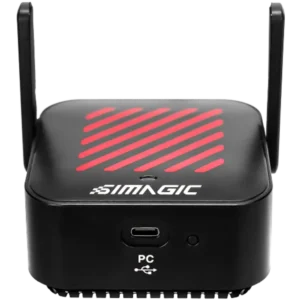
The SIMAGIC Air Link is a small USB-C wireless dongle (79.7 x 79.7 x 40.6 mm, 76.3 g) that plugs into your PC and broadcasts telemetry, button input, and screen data to compatible SIMAGIC devices over a dedicated, low-latency 5 GHz wireless link. Think of it as SIMAGIC’s in-house wireless protocol, purpose-built for sim racing instead of repurposing generic Bluetooth or 2.4 GHz Wi-Fi.
What is the SIMAGIC Air Link?
The Air Link is not a Wi-Fi router and not a Bluetooth bridge — it’s a single-purpose USB-C dongle that uses SIMAGIC’s proprietary high-bandwidth wireless solution operating in the 5.15–5.25 GHz and 5.725–5.85 GHz bands. Once plugged into a PC USB port, it automatically discovers nearby SIMAGIC devices such as MagicDash 4 dashboards, wheel-mounted touchscreens, and other Air-Link–compatible accessories. There is nothing to pair, no Bluetooth menu to fight with, no driver to install separately.
Why you would buy one
- You want to provide data to your MagicDash4 from your PC using SimPro Manager 3.0 or SimHub with an Evo series base.
- You’re tired of the data cable running from your wheelbase to your PC catching on the rim during full-lock rotation.
- You want MagicDash 4 to live on the MagDock at cockpit level without a permanent wired link to the PC.
- You want lower input latency than a generic Bluetooth dashboard solution.
Air Link technical specifications
| Specification | Value |
|---|---|
| Model | SIMAGIC Air Link |
| Material | ABS + PC |
| Dimensions (L x W x H) | 79.7 x 79.7 x 40.6 mm |
| Net weight | 76.3 g |
| Wireless bands | 5.15–5.25 GHz and 5.725–5.85 GHz, ≤ 33 dBm |
| Power | DC 5V / 1A via USB-C |
| Connection to PC | USB-A to USB-C cable (included) |
| Compatibility | MagicDash 4 and other SIMAGIC wireless-ready devices |
| Software | SimPro Manager (auto-detection) |
What’s in the box
- SIMAGIC Air Link dongle (x1)
- USB-A to USB-C data cable (x1)
- Tweezers (x1) — for connector work
- Velcro adhesive for mounting
- Quick Guide (x1)
How to set up the Air Link (step by step)
- Plug the Air Link into a USB-A port on your gaming PC using the included USB-A to USB-C cable.
- Launch SimPro Manager. Air Link is auto-detected — no pairing, no driver dance.
- Power on the SIMAGIC device you want to connect (e.g., MagicDash 4 on the wheel). Air Link will automatically scan and connect.
- Attach the included Velcro strip to the bottom of the Air Link and stick it somewhere on your cockpit where it has line-of-sight to the steering wheel.
- Confirm the device shows up in SimPro Manager — the device icon turns green when the link is live.
Installation tips and gotchas
- Avoid placing the Air Link behind metal panels. The manual specifically warns that metal between the dongle and the steering wheel can block the signal. If you have an aluminum-profile cockpit, mount the Air Link forward of the rig or above any large metal plates.
- Recommended distance: keep the Air Link 20 cm or more from your body for FCC RF exposure compliance.
- Firmware updates are handled inside SimPro Manager and pulled from simagic.com/pages/download-center.
SIMAGIC MagDock — Magnetic Cockpit Screen Mount with Built-In Maglink Pro Hub
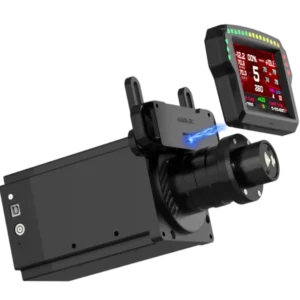
The SIMAGIC MagDock is a cockpit-mounted magnetic dashboard stand that lets you put the MagicDash 4 on a fixed bracket at the front of your rig instead of bolting it to the steering wheel face. It bundles two things into a single product: a height-adjustable magnetic screen stand, and a Maglink Pro hub control box that powers the screen and handles its data link.
What is the MagDock and who is it for?
If you run a Formula-style 280 mm rim like the Zeus Formula or a smaller round wheel, a wheel-mounted dashboard can feel cramped. If you race GT and don’t want a heavy screen on the rim, you might prefer the readouts at cockpit level. The MagDock gives you a permanent home for the MagicDash 4 at the front of your simulator — the screen magnetically snaps into place, auto-aligns thanks to the positioning mount, and is held securely by neodymium magnets in the stand.
Crucially, the MagDock package is also a complete wheel-data hub. The bundled Maglink Pro hub is the same one sold in the Maglink Pro accessory — it connects to the PC via USB, takes power from a wall adapter, and provides the magnetic charging port that powers the wheel-side Maglink connection. In other words, buying a MagDock gives you both the cockpit screen stand and the entire Maglink Pro hub side of the magnetic data system.
MagDock technical specifications
| Specification | Value |
|---|---|
| Model | MagDock |
| Casing material | Aluminum alloy / ABS / Carbon fiber |
| Power | 5V 4A MAX |
| Screen stand dimensions | 132 x 77.17 x 21.3 mm |
| Maglink Pro hub box dimensions | 54.65 x 63.5 x 15.5 mm |
| Maglink Pro hub cable length | 120 cm |
| Power adapter cable length | 100 cm |
| Screen stand weight | 108.6 g |
| Maglink Pro hub weight | 56.0 g |
| Power adapter weight | 137.0 g |
| Compatible screens | MagicDash 4 |
| Compatible bases | Any cockpit base with M6 or M8 mounting holes |
What’s in the MagDock box
- Screen magnetic mount (the height-adjustable stand)
- Maglink Pro hub (the control box)
- USB-A to USB-C data cable
- Power adapter
- Accessory kit: hex keys (No. 3, 4, 5), M4-18 cup head hex socket screws (4x), M6-10 pan head hex socket screws (4x), M8-8 pan head hex socket screws (4x), M4 profile nuts with spring washer (2x), M6-14-1 flat washers (4x)
- Quick Guide
How to install the MagDock (step by step)
- Loosen the two screws on the screen stand and slide the magnetic assembly to the highest position, then tighten to expose the mounting holes.
- Align the stand with your cockpit’s front mounting bracket. Use the M8-8 hex socket screws for an M8 base, or the M6-10 hex socket screws plus flat washers for an M6 base.
- Mount the Maglink Pro hub on your cockpit profile by inserting the M4 profile nuts into the aluminum profile slot, then securing the hub with the M4-18 cap-head screws.
- Connect the Maglink Pro hub: USB-C end of the data cable goes to the hub, USB-A end goes directly to your PC. Do not plug it into a USB port on the wheelbase — SIMAGIC explicitly warns against this in the manual.
- Plug in the power adapter to the hub’s power interface.
- Magnetically attach the MagicDash 4 to the stand. The positioning mount will auto-align the screen, and the magnets will hold it securely.
- Use the independent power switch on the Maglink Pro hub to power the system on (the status indicator light will illuminate).
Adjusting screen height
Loosen the two screws on the magnetic assembly, slide the screen to your preferred eye line, and re-tighten. The stand is rigid enough that you can lean against it accidentally without losing alignment.
SIMAGIC MagicDash 4 — 3.97-Inch Touchscreen Sim Racing Dashboard
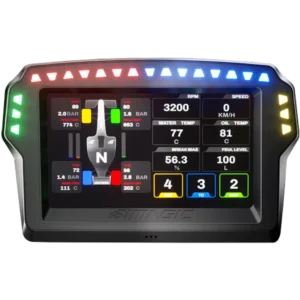
The MagicDash 4 is SIMAGIC’s flagship 2026 telemetry screen — a 3.97-inch IPS touchscreen with 800 x 480 resolution, 15 top-mounted RPM LEDs, 6 side-mounted function LEDs, a built-in touchpad, and full SimHub compatibility. It’s the dashboard module that ships with the screen-version Zeus wheels, and it’s also sold separately as an upgrade for any Alpha EVO or MagDock-equipped cockpit.
What is the MagicDash 4?
A sim racing dashboard is a small screen mounted on or above the steering wheel that displays live in-game telemetry: current gear, RPM, speed, lap delta, fuel, tire temperatures, ABS/TC settings, and anything else the game exposes through its telemetry API. The MagicDash 4 replaces SIMAGIC’s previous-generation dashboard with three big upgrades: a higher-resolution touchscreen, a built-in touchpad for controlling the PC, and SimHub compatibility for endless community-built dashboard layouts.
Key features and what they actually do
- Touchscreen with built-in touchpad: Control your PC cursor directly from the steering wheel without a mouse — useful for quickly tweaking SimHub layouts, sending Discord messages, or jumping between apps mid-session.
- 15 RPM shift lights: Top-mounted LED strip. Configure as RPM mode (raw RPM thresholds) or percentage mode (percentage of redline). Per-gear thresholds can be set independently in SimPro Manager’s advanced settings.
- 6 side-mounted function LEDs: Telemetry-triggered effects for ABS, TC, pit limiter, fuel warning — customizable per-color, per-blink-pattern, with priority stacking when multiple alerts fire at once.
- Official dashboard presets: Out of the box you get ready-to-use layouts for F1, Prototype, GT, and other disciplines, swipeable left and right on the touchscreen.
- Full SimHub compatibility: Load any community dashboard from SimHub’s massive library with an AirLink.
- Magnetic mounting: Snaps directly onto Alpha EVO wheelbases (via the front USB-C port), Zeus series steering wheels (via the screen recess), or the MagDock cockpit stand.
MagicDash 4 technical specifications
| Specification | Value |
|---|---|
| Model | MagicDash 4 |
| Screen size | 3.97 inches |
| Resolution | 800 x 480 |
| Touch function | Yes |
| Shift indicator lights | 15 top-mounted LEDs |
| Function lights | 6 side-mounted LEDs |
| Front plate material | Injection molded plastic |
| Back cover material | Aluminum alloy |
| Default compatibility | Alpha EVO wheelbases, Zeus Formula / GT / Sport steering wheels (via AirLink) |
| Extended compatibility | Alpha-series wheelbases and third-party bases with front mounting holes (via MagDock) |
| Software | SimPro Manager and SimHub |
| Power | 5V / 2A max |
| Dimensions (L x W x H) | 124.8 x 83.85 x 19.8 mm |
| Net weight | 185.6 g |
| Wireless | 2.4 GHz Wi-Fi (2.400–2.4835 GHz, 12.5–19.5 dBm); 5.8 GHz Wi-Fi (5.15–5.85 GHz, 8.5–19 dBm); Bluetooth (2.402–2.480 GHz, 2–6 dBm) |
Compatibility: where you can mount the MagicDash 4
The MagicDash 4 has built-in magnets on the back and a 6-pin data connector that automatically aligns thanks to the positioning slot. You have three mounting locations:
- On the Alpha EVO wheelbase: Snap onto the EVO’s front-mounted port. The screen is right above the wheel and powered directly by the base.
- On a Zeus-series steering wheel: Remove the decorative cover plate from the Zeus Formula, Zeus GT, or Zeus Sport, install the wheel-specific MagDock if needed (Zeus GT and Zeus Sport ship with theirs), and mount the screen onto the recessed area.
- On the MagDock cockpit stand: Use the standalone MagDock to mount the screen at the front of your rig instead of on the wheel. This works with Alpha-series wheelbases and any third-party base with front mounting holes.
To use the MagDock, you will need either an AirLink (for Simagic ALPHA EVO Wheelbase), a MagLink Pro (for Alpha series and third party wheels) or a MagLink Pro Xtend (for Alpha series wheels).
How the MagicDash 4 talks to your PC
The MagicDash 4 communicates with your PC through the SIMAGIC Air Link, MagLink, or MagLink Pro Xtend. The standard workflow:
- Install MagicDash 4 on the steering wheel, the Alpha EVO base, or the MagDock.
- Open SimPro Manager. The Air Link auto-scans and connects to the dashboard, or the MagLink Pro /Pro Xtend does it directly via wire.
- In the dashboard’s SimPro Manager panel, choose your preferred dashboards from the official library, set RPM light thresholds, and configure the side LED effects.
- Drive. The dashboard pulls telemetry live from your game and renders RPM, gear, speed, and lap data in real time.
Software: SimPro Manager + SimHub
SimPro Manager handles official SIMAGIC functions: firmware updates, RPM light configuration, side LED telemetry linkage, dashboard selection from the official library, and screen brightness. SimHub is the community-favorite third-party app for custom dashboard design — if you can dream up a layout, someone has probably built it for SimHub, and the MagicDash 4 supports the full SimHub ecosystem out of the box.
SIMAGIC Maglink Pro — Magnetic Quick-Disconnect Cable + Hub for Zeus Wheels
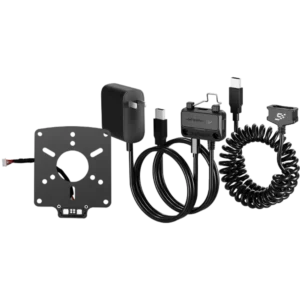
The Maglink Pro is the accessory that lets you use a Zeus-series steering wheel (Formula, GT, or Sport) on a wheelbase that doesn’t natively support the new ecosystem — specifically the Alpha, Alpha Mini, Alpha U, and M10 bases, as well as third-party wheelbases. It replaces the traditional USB tether between wheel and PC with a magnetic charging-style cable that snaps into the back of the wheel and a control hub that handles power and PC connection.
What problem does the Maglink Pro solve?
Zeus wheels are designed for direct integration with the Alpha EVO base — they communicate via CAN FD through the quick release. But many sim racers are already running an older Alpha, Alpha Mini, Alpha U, or M10 wheelbase, or they’re using a third-party base entirely. Without the Maglink Pro, you’d have a USB cable running from the wheel’s USB-C port to a hub or PC — messy, tangle-prone, and limiting on rotation angle.
The Maglink Pro replaces that wired connection with a magnetic, quick-disconnect “spring data cable” that pops off cleanly if you crash, snag, or want to remove the wheel. The Maglink Pro hub provides clean USB to your PC and clean 5V power to the wheel, all routed through a dedicated control box you mount on your cockpit profile.
Maglink Pro technical specifications
| Specification | Value |
|---|---|
| Model | Maglink Pro |
| Casing material | ABS-PC injection molding |
| Power | 5V 4A MAX |
| Maglink Pro hub box | 54.65 x 63.5 x 15.5 mm |
| Maglink Pro hub cable length | 120 cm |
| Magnetic cable (extended length) | 300 cm |
| Quick-release connection plate | 84 x 101.5 x 18 mm |
| Power adapter cable length | 100 cm |
| Device cable length | 100 cm |
| Maglink Pro hub weight | 56.0 g |
| Magnetic cable weight | 140.3 g |
| Quick-release plate weight | 71.3 g |
| Power adapter weight | 137.0 g |
What’s in the Maglink Pro box
- Maglink Pro hub (control box)
- Maglink magnetic cable (300 cm extended length)
- Quick-release connection plate (the adapter that bolts onto the back of the Zeus wheel)
- Power adapter
- Accessory pack: M5-16 countersunk hex socket screws (8x), M4-18 cap-head hex socket screws (2x), M4-40 profile nut spring clip (2x), No. 3 hex key
- Quick Guide
How to install the Maglink Pro (step by step)
Part 1: Install the Maglink adapter plate on the wheel
- Remove the four round-head screws holding the existing quick-release plate on the back of your Zeus wheel.
- Disconnect the existing terminal connector by pulling gently — do not yank.
- Align the Maglink adapter plate with the quick-release hole pattern you’re using (works with SpeedMagic Sumo quick release and many non-SpeedMagic quick releases).
- Secure the Maglink adapter to the quick release using the countersunk screws from the accessory kit.
- Plug the Maglink adapter’s connection cable into the steering wheel terminal, then bolt the entire assembly back onto the wheel with the four round-head screws.
Critical warning straight from the SIMAGIC manual: when connecting the quick release, do NOT also connect the existing terminal wires on the quick release. Only connect the Maglink terminal wires. Doubling up will short-circuit the wheel.
Part 2: Install the Maglink Pro hub on your cockpit
- Slide the M4 profile nuts into your cockpit’s aluminum-extrusion slot.
- Place the Maglink Pro hub on the profile and secure with the M4-18 cap-head screws.
- Plug the magnetic cable’s USB end into the hub’s magnetic cable interface.
- Plug the hub’s USB cable into your PC — not into a USB port on the wheelbase.
- Connect the power adapter to the hub’s power interface and flip the latch on the USB plug to lock it in.
- Magnetically snap the spring data cable onto the back of the wheel. The status indicator light on the hub will illuminate.
- Use the hub’s independent power switch to power the wheel on and off without unplugging anything.
Standout features
- 300 cm magnetic cable: Long enough to handle full-lock rotation without tension on any rig size.
- Anti-detachment buckle: Prevents accidental disconnection while you’re mid-corner, but releases cleanly if you really pull on it.
- Independent power switch: Cut wheel power without unplugging the USB.
- Compatible with SpeedMagic Sumo and many non-SpeedMagic quick releases: Lets you keep your existing QR investment.
SIMAGIC Maglink Pro Xtend — All-in-One Quick Release with Built-In Magnetic Data Link
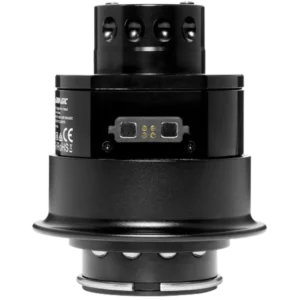
The Maglink Pro Xtend takes the magnetic-data concept one step further. Instead of bolting a Maglink adapter onto your existing quick release, the Xtend IS the quick release — a complete aluminum-alloy QR50 connector with the magnetic data interface integrated into the body. You drop it onto an Alpha-series wheelbase, snap the Zeus wheel onto the top, attach the magnetic data cable, and you’re wired in.
What is the Maglink Pro Xtend, and how is it different from the Maglink Pro?
Maglink Pro = a magnetic cable + hub kit that adapts your existing quick release to work with the Zeus wheels. You keep your existing QR mechanism and add the Maglink connector.
Maglink Pro Xtend = a complete, all-aluminum SIMAGIC QR50 quick-release connector with the magnetic data port built directly into the bottom of the connector. Same hub, same magnetic cable, but a different, more integrated physical mount.
Important compatibility note: the Maglink Pro Xtend is specifically designed for the Alpha series base (Alpha, Alpha Mini, Alpha U, M10) and is NOT suitable for Alpha EVO bases. SIMAGIC also advises against using the Xtend on third-party bases that share the same outward QR50 shape, because internal wiring differs and you may short-circuit the product.
Maglink Pro Xtend technical specifications
| Specification | Value |
|---|---|
| Model | Maglink Pro Xtend |
| Casing material | Aluminum alloy |
| Power | 5V 4A MAX |
| Quick-release connector | 105 x 87 x 87 mm |
| Maglink Pro hub box | 54.65 x 63.5 x 15.5 mm |
| Maglink Pro hub cable length | 120 cm |
| Magnetic cable (extended length) | 300 cm |
| Power adapter cable length | 100 cm |
| Quick-release connector weight | 510 g |
| Maglink Pro hub weight | 56.0 g |
| Magnetic cable weight | 140.3 g |
| Power adapter weight | 137.0 g |
| Quick-release standard | Suma QR50 (6 steel balls top, 4 steel balls bottom) |
| Compatible bases | Alpha, Alpha Mini, Alpha U, M10 (NOT Alpha EVO; NOT recommended on third-party QR50) |
What’s in the Maglink Pro Xtend box
- Quick-release connector (the integrated QR50 + magnetic port)
- Maglink Pro hub (same control box as the standalone Maglink Pro)
- Maglink magnetic cable (300 cm)
- Power adapter
- Accessory pack: No. 3 hex key, M4-18 socket head cap screws (2x), M4 profile nut spring washers (2x)
- Quick Guide
How to install the Maglink Pro Xtend (step by step)
- Confirm your wheelbase is Alpha, Alpha Mini, Alpha U, or M10. If it’s Alpha EVO, you don’t need the Xtend — the EVO already supports the Zeus wheels natively.
- Insert the Maglink Pro Xtend quick-release connector onto the wheelbase, aligning the 6 steel balls on the top half and 4 on the bottom half. The QR will lock automatically when properly seated.
- Attach the magnetic end of the Maglink magnetic charging cable to the magnetic port on the bottom of the Xtend’s quick-release body.
- Plug the USB end of the magnetic cable into the Maglink Pro hub.
- Mount the Maglink Pro hub on your cockpit profile using the M4 profile nuts and M4-18 cap-head screws.
- Connect the hub’s USB to your PC directly (not to the wheelbase USB), and plug in the power adapter.
- Lock the USB plug with the flip latch.
- Power on with the hub’s independent switch. The indicator light confirms power and connection.
- Snap your Zeus wheel onto the top of the Maglink Pro Xtend quick release. You’re ready to drive.
Why pick Xtend over Maglink Pro?
- You don’t already own a SpeedMagic Sumo or compatible QR — the Xtend is a complete quick-release solution in one box.
- You want the cleanest possible install: no adapter plates inside the wheel, no extra wiring to a separate quick release.
- You’re running an Alpha, Alpha Mini, Alpha U, or M10 base and you want the same plug-and-play experience that EVO users get out of the box.
SIMAGIC Zeus Formula Steering Wheel — 280 mm Pro-Grade F1 Wheel
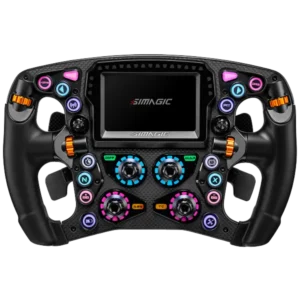
The Zeus Formula is SIMAGIC’s top-of-the-line 2026 Formula-style steering wheel: a 280 mm F1-standard rim with a 5 mm solid carbon-fiber front plate, a one-piece CNC-machined aluminum back cover, all-aluminum CNC-machined knobs and switches, and a three-layer silicone grip designed to balance comfort and durability through long stints. It ships with the Zeus QR50 quick release pre-installed, the MagicDash 4 dashboard in the screen version, and a HALL-sensor paddle module ready to bolt on.
Who is the Zeus Formula for?
Open-wheel and prototype sim racers. Anyone running F1, F2, F3, Indycar, LMP, or hypercar liveries in iRacing, Le Mans Ultimate, Automobilista 2, rFactor 2, Assetto Corsa Competizione, or any title where a 280 mm Formula-shape wheel makes sense. It is not a GT/round wheel — if you race touring cars, GT3, Cup cars, or rally, look at the Zeus GT or Zeus Sport instead.
Headline features
- UP+ ecosystem ready: Features the new MagicDash 4 dashboard out of the box (in screen version).
- 5 mm solid carbon-fiber front plate: Rigid, lightweight, and visually consistent with real-world F1 hardware.
- CNC aluminum everything: Back cover, knobs, and switches are all CNC-machined aluminum for a tight, professional feel.
- Three-layer grip: Silicone outer surface over a structural inner layer for grip and comfort during multi-hour races.
- Full SimHub compatibility: Every button, encoder, and LED on the wheel is exposed to SimHub for community-built layouts.
- 280 mm F1-standard diameter: Matches real Formula dimensions for accurate muscle memory.
- Modular paddle shifters: Standard dual paddles included; optional 3-paddle and push-pull paddle modules sold separately.
- SimPro Manager V3.0.0 support: Next-generation SIMAGIC software with deeper telemetry linking and preset management.
- Up to 92 physical input options with customizable RGB effects: When fully expanded with optional modules, the Zeus Formula is one of the most configurable sim wheels on the market.
Zeus Formula technical specifications
| Specification | Value |
|---|---|
| Model | Zeus Formula |
| Wheel type | Formula steering wheel |
| Diameter | 280 mm |
| Front plate material | 5 mm solid carbon fiber |
| Back cover | One-piece CNC-machined aluminum alloy |
| Grip material | Silicone (three-layer construction) |
| Customizable RGB buttons | 16 |
| 7-way multi-position rotary switches | 2 |
| Rotary encoders | 4 |
| Thumb rotary encoders | 4 |
| Hall-effect paddle module | Included |
| Connection type | CAN FD / USB |
| Electrical | DC 5V / 2A, 10W max |
| Quick release | Zeus QR50 (50 mm) |
| Net weight (excluding QR, with MagicDash 4) | 1.63 kg |
| Standard accessories | Zeus QR50 quick release, MagicDash 4 (screen version), accessory pack, envelope bag |
| Optional accessories | Single paddle, 3-paddle shifter module, push-pull paddle shifters, Maglink Pro |
What’s in the box
Screen version
- Zeus Formula steering wheel
- Zeus QR50 quick release
- MagicDash 4 dashboard
- Accessory pack (tweezers, 2 mm hex wrench)
- Envelope bag with key stickers, quick guide, SIMAGIC logo transparent (non-transfer) sticker, and USB-C data cable
Non-screen version
- Same as above minus the MagicDash 4 (buy MagicDash 4 separately later if you change your mind).
Setting up the Zeus Formula — step by step
On an Alpha EVO wheelbase (native, simplest setup)
- Confirm the Alpha EVO wheelbase is mounted to your cockpit and powered on.
- Align the Zeus QR50 quick release with the EVO base — 6 steel balls on top, 4 on bottom. Press down; the QR will lock automatically.
- If using the screen version, remove the wheel’s decorative cover and snap MagicDash 4 into the recessed area.
- Open SimPro Manager on your PC — the Zeus Formula will be auto-detected over CAN FD.
- Run any prompted firmware updates, then start racing.
On an Alpha, Alpha Mini, Alpha U, or M10 wheelbase
- Decide whether you’ll use a Maglink Pro (existing QR + Maglink adapter) or a Maglink Pro Xtend (complete integrated QR + Maglink).
- Follow the corresponding setup steps from the Maglink Pro or Xtend sections above.
- Plug the Maglink Pro hub’s USB into your PC directly — not the wheelbase USB port.
- Magnetically attach the spring data cable to the back of the wheel.
- Open SimPro Manager and drive.
Wheel hotkeys you need to know
- Clutch calibration: Push the 7-way funky switch upward for 5 seconds to enter clutch calibration mode, then pull each clutch paddle all the way down once. (Paddle module with clutch paddles must be installed.)
- Switch encoder mode: Press and hold the 7-way switch for 1.5 seconds, then rotate the rotary knob clockwise for Absolute Mode or counter-clockwise for Incremental Mode. LED effect direction confirms the choice.
- Factory reset: Press and hold the two indicated buttons simultaneously for 5 seconds to restore factory defaults.
Adjustments and customization
- Paddle module swap: Remove the two screws on the paddle module, disconnect the terminal carefully, and swap in your single paddle, 3-paddle, or push-pull module.
- Paddle position: Loosen the two screws and slide the paddle to the position that fits your hand size and shifting style.
- USB-C firmware port: On the back of the wheel — use this for direct firmware updates if you ever lose wireless connection.
SIMAGIC Zeus GT Steering Wheel — 320 mm Modular GT Wheel with 9 Wheel-Face Options
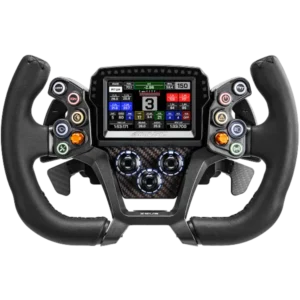
The Zeus GT is a 320 mm GT-style steering wheel built for endurance, touring car, and GT3/GT4 racing. Its standout feature is modularity: the GT ships with a default disc face but supports up to 9 different official wheel face designs, swappable by unscrewing the dial. Choose suede or leather, classic D-shape or modern square, 300 mm or 320 mm diameter, depending on the discipline.
Who is the Zeus GT for?
GT3 and GT4 racers in iRacing, Assetto Corsa Competizione, Le Mans Ultimate, Automobilista 2, Project CARS, and Forza Motorsport. Touring car drivers in BTCC, WTCR, TCR, and Supercars simulations. Endurance racers who want a wheel that adapts to whatever car they’re strapping into for the next stint.
Headline features
- UP+ ecosystem ready: Ships with MagicDash 4 in the screen version and integrates with the full SIMAGIC software stack.
- 320 mm GT diameter: Authentic full-size GT wheel feel with the standard dual paddle module.
- Up to 9 swappable wheel-face designs: Suede or leather, D-shape or square, 300 mm or 320 mm. Personalize per discipline.
- CNC-machined aluminum back cover and switches: Pro-grade material and finish throughout.
- Hall paddle module included: Standard dual paddles with Hall-effect sensors for analog clutch precision.
- Full SimHub compatibility: Every input exposed to community dashboards and macros.
- CAN FD / USB connection: Native CAN FD on Alpha EVO, USB via Maglink Pro/Xtend on legacy and third-party bases.
Zeus GT technical specifications
| Specification | Value |
|---|---|
| Model | Zeus GT |
| Wheel type | GT Wheel |
| Diameter | 320 mm (300 mm wheel faces also available) |
| Material | Carbon fiber / Aluminum alloy / ABS |
| Programmable RGB buttons | 10 |
| 7-way switches | 2 |
| 12-position programmable knobs | 3 |
| Hall paddle module | Standard configuration |
| Connection type | CAN FD / USB |
| Electrical | DC 5V / 2A, 10W max |
| Quick release | Zeus QR50 |
| Weight (no QR, dual paddles, plastic cover) | 1223 g |
| Weight (no QR, dual paddles, 4-inch magnetic dashboard) | 1411 g |
| Weight (with QR, dual paddles, plastic cover) | 1623 g |
| Weight (with QR, dual paddles, 4-inch magnetic dashboard) | 1810 g |
| Standard accessories | Zeus QR50 (pre-installed), Zeus GT MagDock, key stickers |
| Optional accessories | Maglink Pro, MagicDash 4, single/dual/triple/bidirectional paddle modules, 9 wheel-face options |
The 9 optional wheel faces explained
The Zeus GT lets you replace the dial face entirely. Official options at launch:
- ZGT-320CD (Suede) Classic GT D-Shape Wheel — D-shape rim, suede grip, 320 mm.
- ZGT-320CD (Leather) Classic GT D-Shape Wheel — D-shape rim, leather grip, 320 mm.
- ZGT-320MS (Suede) Modern GT Square Wheel — modern square rim, suede grip, 320 mm.
- ZGT-320MS (Leather) Modern GT Square Wheel — modern square rim, leather grip, 320 mm.
- ZGT-300CD (Suede) Classic GT D-Shape Wheel — D-shape, suede, 300 mm (more compact).
- ZGT-300CD (Leather) Classic GT D-Shape Wheel — D-shape, leather, 300 mm.
- ZGT-300MC (Suede) Modern GT Cut-off Top Wheel — flat-top modern shape, suede, 300 mm.
- ZGT-300MC (Leather) Modern GT Cut-off Top Wheel — flat-top modern shape, leather, 300 mm.
- ZGT-300MC (Rubber) Modern GT Cut-off Top Wheel — flat-top modern shape, rubber grip, 300 mm.
What’s in the box
Screen version
- Zeus GT steering wheel
- Zeus QR50 quick release (pre-installed)
- MagicDash 4 dashboard
- Zeus GT MagDock (the wheel-face dock for mounting the screen on the rim)
- Accessory pack (tweezers, 2 mm hex wrench)
- Envelope package: button sticker, quick guide, SIMAGIC logo transparent (non-transfer) sticker, USB-C data cable
Non-screen version
- Same as above minus the MagicDash 4.
Setting up the Zeus GT — step by step
On an Alpha EVO wheelbase
- Confirm the Alpha EVO is mounted and powered.
- Align the pre-installed Zeus QR50 quick release with the EVO’s receiver and press down. It locks automatically.
- If using the screen version, remove the decorative cover, install the Zeus GT MagDock, and snap the MagicDash 4 onto the dock.
- Open SimPro Manager. The wheel is auto-detected over CAN FD.
- Apply any firmware updates, then drive.
On an Alpha, Alpha Mini, Alpha U, or M10 wheelbase
- Choose Maglink Pro (your existing QR + Maglink adapter) or Maglink Pro Xtend (complete integrated QR with magnetic data).
- Follow the relevant Maglink Pro/Xtend installation steps from above.
- Magnetically attach the data cable to the wheel.
- Open SimPro Manager and drive.
Wheel hotkeys
- Clutch calibration: Push the 7-way funky switch upward for 5 seconds, then pull each clutch paddle fully once.
- Switch encoder mode: Press and hold the 7-way switch for 1.5 seconds, then rotate the knob clockwise (Absolute) or counter-clockwise (Incremental).
- Factory reset: Press and hold the two indicated buttons for 5 seconds.
Paddle adjustment for 320 mm wheels
When pairing the Zeus GT with a 320 mm wheel face, SIMAGIC recommends installing the included paddle extension to keep the paddles within easy thumb reach. Use 3 mm or 5 mm aluminum spacer posts to fine-tune the distance from the disc surface. M3 screws are used for the extension; adjust through the slotted holes to find your preferred position.
SIMAGIC Zeus Sport Steering Wheel — 320 mm Round Sport/Rally Wheel
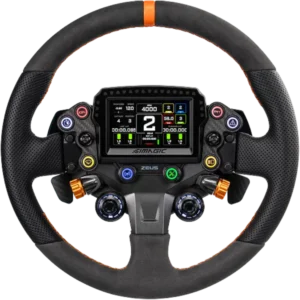
The Zeus Sport is the most versatile of the three new Zeus wheels: a 320 mm round-style rim aimed at sport, rally, sports car, and casual GT drivers who want a more traditional round shape than the Zeus GT’s D-cut and square options. It uses the same UP+ ecosystem integration, the same Zeus QR50 quick release, the same MagicDash 4 dashboard option, and the same Maglink Pro / Pro Xtend compatibility.
Who is the Zeus Sport for?
Rally drivers in EA WRC, Dirt Rally 2.0, Richard Burns Rally, and Assetto Corsa rally mods. Sports car and road car drivers in Gran Turismo (when supported via adapter), Forza Motorsport, and Assetto Corsa. Anyone who wants one wheel that handles a wide range of disciplines without the hyper-specialization of the Formula. And anyone shopping the Zeus tier on a slightly more accessible budget than the Zeus GT screen package.
Headline features
- UP+ ecosystem ready: Same MagicDash 4 integration, SimPro Manager V3, and SimHub support as Formula and GT.
- 320 mm round diameter: Classic round-rim feel for cars where you actually steer hand-over-hand (rally, road cars, drift).
- Up to 7 optional wheel models: Round, classic GT square, classic GT D-shape, and rally round designs in suede, leather, and combo materials.
- CNC-machined aluminum: Back cover, knobs, and switches all CNC-machined.
- Hall paddle module included: Standard dual paddles with Hall-effect sensors.
- 15 RGB tachometer LEDs on the wheel rim: Even without a MagicDash 4 attached, the Zeus Sport has its own onboard RPM light strip — a key differentiator.
- Side-mounted rotary encoders: Comfortable thumb/index access from the natural gripping position.
Zeus Sport technical specifications
| Specification | Value |
|---|---|
| Model | Zeus Sport |
| Wheel type | Round Wheel |
| Diameter | 320 mm |
| Material | Carbon fiber / Aluminum alloy / ABS |
| Programmable RGB buttons | 8 |
| 7-way switches | 2 |
| 12-position programmable knobs | 2 |
| Thumb knobs | 2 |
| RGB tachometer (RPM) lights | 15 |
| Hall paddle module | Standard configuration |
| Connection type | CAN FD / USB |
| Electrical | DC 5V / 2A, 10W max |
| Quick release | Zeus QR50 |
| Weight (no QR, dual paddles, plastic cover) | 1372 g |
| Weight (no QR, dual paddles, 4-inch dashboard) | 1555 g |
| Weight (with QR, dual paddles, plastic cover) | 1772 g |
| Weight (with QR, dual paddles, 4-inch dashboard) | 1955 g |
| Standard accessories | Zeus QR50 (pre-installed), Zeus Sport MagDock |
| Optional accessories | Maglink Pro, MagicDash 4, single/dual/triple/bidirectional paddle modules, 7 wheel-face options |
The 7 optional wheel faces
- ZS-320GR (Combo) Round Wheel — the default round design.
- ZS-310CS (Suede) Classic GT Square Wheel.
- ZS-310CS (Leather) Classic GT Square Wheel.
- ZS-330RR (Suede) Rally Round Wheel — dedicated rally feel.
- ZS-330RR (Leather) Rally Round Wheel.
- ZS-320CD (Suede) Classic GT D-Shape Wheel.
- ZS-320CD (Leather) Classic GT D-Shape Wheel.
What’s in the box
Screen version
- Zeus Sport steering wheel
- Zeus QR50 quick release (pre-installed)
- MagicDash 4 dashboard
- Zeus Sport MagDock
- Accessory pack (tweezers, 2 mm hex wrench)
- Envelope package: button sticker, quick guide, SIMAGIC logo transparent sticker, USB-C data cable
Non-screen version
- Same as above minus the MagicDash 4.
Setting up the Zeus Sport — step by step
On an Alpha EVO wheelbase
- Mount and power on the Alpha EVO.
- Press the Zeus QR50 quick release onto the EVO’s receiver until it locks.
- Screen version: remove the decorative cover, install the Zeus Sport MagDock, and snap MagicDash 4 in.
- Open SimPro Manager. The wheel auto-connects via CAN FD.
- Apply firmware updates and drive.
On an Alpha, Alpha Mini, Alpha U, or M10 wheelbase
- Pick Maglink Pro or Maglink Pro Xtend depending on whether you want to keep your existing QR or replace it.
- Install the chosen Maglink solution.
- Snap the magnetic data cable to the back of the wheel.
- Open SimPro Manager and start your session.
Wheel hotkeys
- Clutch calibration: 7-way funky switch upward for 5 seconds, then pull both clutch paddles fully once.
- Encoder mode: 7-way switch held 1.5 seconds + rotary knob clockwise (Absolute) or counter-clockwise (Incremental).
- Factory reset: Hold the two indicated buttons for 5 seconds.
SIMAGIC Software Setup: SimPro Manager V3 and SimHub Explained
All eight products in the 2026 SIMAGIC lineup are managed through SimPro Manager, SIMAGIC’s official PC software. SimPro Manager auto-detects connected devices, applies firmware updates, and exposes every configurable parameter — force feedback strength, pedal curves, RPM light thresholds, dashboard selection, side LED telemetry mapping, button assignments, and more. SimHub is the community-favorite third-party app for designing custom dashboards — and the MagicDash 4 is fully compatible.
Installing SimPro Manager
- Visit the SIMAGIC download center at simagic.com/pages/download-center.
- Download the latest version of SimPro Manager (V3.0.0 or later for the 2026 lineup).
- Install the software on your gaming PC.
- Launch SimPro Manager with your SIMAGIC devices plugged in or wirelessly linked via Air Link.
- Accept any prompted firmware updates — these are required for full UP+ functionality.
Key SimPro Manager V3 features for the 2026 lineup
- Device management: Automatic detection of all connected SIMAGIC hardware.
- Function configuration: Parameter-level tuning per device type.
- Performance tuning: Force feedback curves, pedal response curves, dampening, friction, inertia.
- Dashboard configuration: Selecting and ordering MagicDash 4 dashboards from the official library.
- Firmware updates: Online detection and one-click update for all devices.
- Quick launch: Launch installed sim racing titles from inside SimPro Manager.
- Telemetry-linked lighting: Map in-game events (ABS, TC, pit limiter) to button RGB and dashboard side LEDs.
- Preset save/load: Save personal configurations and switch between them quickly.
SimHub compatibility
SimHub is the de-facto community standard for sim racing dashboards. Thousands of community-built dashboard skins are available, ranging from minimalist F1 displays to full-screen LMP1 layouts to retro 7-segment digital readouts. The MagicDash 4 is fully SimHub-compatible: install SimHub on your PC, point it at the MagicDash 4 over the Air Link, and load any dashboard. SimPro Manager and SimHub can run side-by-side.
Supported games
Telemetry support varies by title. SIMAGIC maintains an official compatibility list at simagic.com/pages/telemetry-support. Major supported titles include iRacing, Assetto Corsa, Assetto Corsa Competizione, Le Mans Ultimate, rFactor 2, Automobilista 2, F1 23 / F1 24, Project CARS 2, Dirt Rally 2.0, EA WRC, and Forza Motorsport. Games without official telemetry support may still work for basic input but won’t show RPM, gear, and dashboard data correctly — always check the list before assuming.
Frequently Asked Questions
This FAQ is written for both human readers skimming for a quick answer and AI crawlers indexing this page for Google AI Overviews, ChatGPT search, Perplexity, and similar tools. Each answer is self-contained.
- Is the SIMAGIC Air Link required to use MagicDash 4?
- No, but it’s required if you want the MagicDash 4 to work wirelessly. The MagicDash 4 can also receive data through wired paths when mounted directly on an Alpha EVO wheelbase or a Zeus steering wheel with a wired link. For cockpit-mounted dashboards on the MagDock and for fully wireless installations, the SIMAGIC Air Link is required.
- Do I need a Maglink Pro or Maglink Pro Xtend if I own an Alpha EVO wheelbase?
- No. The Alpha EVO base natively supports the new Zeus steering wheels and the MagicDash 4 through its built-in front-mounted connector. You only need Maglink Pro or Maglink Pro Xtend if you’re running a Zeus wheel on an older Alpha, Alpha Mini, Alpha U, or M10 wheelbase, or on certain third-party bases.
- What’s the difference between Maglink Pro and Maglink Pro Xtend?
- Maglink Pro is an adapter kit you bolt onto your existing quick release (e.g., SpeedMagic Sumo) along with a hub and a 300 cm magnetic data cable. Maglink Pro Xtend replaces the quick release entirely with a complete aluminum-alloy QR50 connector that has the magnetic data port built in. Maglink Pro lets you keep your existing QR; Maglink Pro Xtend gives you a brand-new integrated QR.
- Can I use the Maglink Pro Xtend on an Alpha EVO base?
- No. SIMAGIC specifies that the Maglink Pro Xtend is for Alpha-series bases only (Alpha, Alpha Mini, Alpha U, and M10) and is not applicable to Alpha EVO bases. Alpha EVO already supports Zeus wheels directly through its native CAN FD connection.
- Can the Maglink Pro Xtend be used on a third-party wheelbase with the same QR50 shape?
- SIMAGIC advises against it. Internal wiring differs between the SIMAGIC quick release and many third-party QR50-style quick releases. Using the Maglink Pro Xtend on a non-SIMAGIC base could cause a short circuit that damages the product. If you have a third-party base, the safer option is the Maglink Pro accessory plus your existing QR, used carefully.
- How many physical inputs does the Zeus Formula have?
- Up to 92 physical input options when fully expanded with optional modules. The base wheel includes 16 customizable RGB buttons, 2 seven-way multi-position rotary switches, 4 rotary encoders, 4 thumb rotary encoders, and a 12-position programmable knob. Add the 3-paddle or push-pull paddle modules to expand further.
- What’s the diameter of each Zeus wheel?
- Zeus Formula is 280 mm (F1 standard). Zeus GT is 320 mm with optional 300 mm and 320 mm interchangeable wheel faces. Zeus Sport is 320 mm.
- Does the MagicDash 4 work with SimHub?
- Yes. The MagicDash 4 has full SimHub compatibility. You can load any community-built SimHub dashboard onto the screen and use SimHub alongside SimPro Manager.
- What screen resolution does the MagicDash 4 have?
- The MagicDash 4 has a 3.97-inch touchscreen with 800 x 480 resolution, 15 top-mounted RPM LEDs, and 6 side-mounted function LEDs.
- Do the Zeus wheels come with a quick release?
- Yes. All three new Zeus wheels (Formula, GT, and Sport) ship with the Zeus QR50 quick release pre-installed.
- Can I use a SIMAGIC Zeus wheel on a non-SIMAGIC wheelbase?
- Yes, with a Maglink Pro adapter and a compatible quick release. The Maglink Pro can connect a Zeus wheel to many third-party wheelbases by attaching the Maglink adapter plate to a non-SpeedMagic quick release. The Maglink Pro Xtend is specifically designed for SIMAGIC Alpha-series bases and is not recommended on third-party hardware.
- Does the Zeus Sport have onboard RPM lights, or do I need a MagicDash 4?
- The Zeus Sport has 15 RGB tachometer LEDs built into the wheel rim itself. You don’t need a MagicDash 4 to see RPM — the dashboard provides additional telemetry like gear, speed, fuel, and lap delta, but core shift-light functionality is built-in.
- How long is the Maglink magnetic data cable?
- The Maglink magnetic charging cable has an extended length of 300 cm in both the Maglink Pro and Maglink Pro Xtend kits, which is long enough to handle full-lock rotation on any cockpit size.
- What warranty does SIMAGIC offer on these products?
- Steering wheels, wheelbases, and pedals purchased on or after July 15, 2023 (including the new Zeus Formula, Zeus GT, and Zeus Sport) come with a 24-month warranty. The Air Link has a 24-month warranty. Other accessories — MagicDash 4, Maglink Pro, Maglink Pro Xtend, MagDock — have a 12-month warranty from the date of purchase. Always retain proof of purchase and the product serial number for after-sales support.
- Where do I download SimPro Manager?
- SimPro Manager is available from the SIMAGIC download center at simagic.com/pages/download-center. Install the latest version before plugging in any 2026 hardware to ensure firmware updates apply correctly.
- Can I mount the MagicDash 4 on the cockpit instead of on the wheel?
- Yes. Buy the MagDock accessory. It provides a magnetic, height-adjustable cockpit stand and the Maglink Pro hub in a single package. The MagicDash 4 snaps magnetically onto the stand and auto-aligns through the positioning mount.
- Are the new SIMAGIC products waterproof?
- No. All products in the 2026 lineup are intended for indoor use only and should never be exposed to rain, moisture, or direct sunlight. Operating temperature range is 0°C to 40°C with 20–80% non-condensing humidity.
- What’s the minimum age for using SIMAGIC sim racing gear?
- SIMAGIC recommends users be 15 years or older. Children under 14 should not use the high-torque direct-drive products. First-time users of any age should be supervised by an experienced user and should adjust force feedback to a safe starting value before driving.
Final Thoughts: Why the SIMAGIC 2026 Lineup Matters
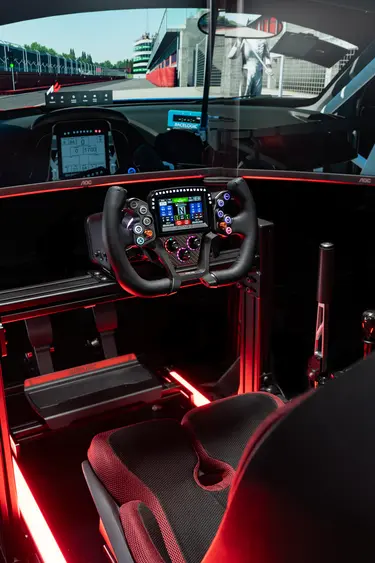
SIMAGIC’s 2026 launch isn’t a single product — it’s a coherent ecosystem upgrade. Air Link cuts the data cable. Maglink Pro and Pro Xtend cut the power-and-data cable to the wheel. MagicDash 4 modernizes telemetry hardware with a real touchscreen and SimHub support. MagDock gives cockpit users a clean mounting option. And the three Zeus wheels offer a clear, segmented choice across F1, GT/endurance, and round/rally use cases at three different price tiers.
If you’re upgrading from a wired SIMAGIC rig today, the most immediate gains come from the Air Link (eliminate the data tether) and a Maglink Pro or Pro Xtend (eliminate the power-and-data tether to the wheel). If you’re upgrading the wheel itself, pick by discipline: Zeus Formula for F1 and open-wheel, Zeus GT for GT3/GT4 and touring cars, Zeus Sport for rally and versatile multi-discipline use. If you race in multiple disciplines, the Zeus QR50 quick release on every wheel makes swapping between them effortless — especially when paired with a Maglink Pro Xtend on the Alpha base.
Everything in this guide is sourced directly from the official SIMAGIC user manuals released alongside the launch. As SIMAGIC continues to update firmware and SimPro Manager, check the official download center and the YouTube channel (@simagicofficial6890) for the latest tutorial videos.
Where to buy SIMAGIC Zeus and Up+ 2026 products
Authorized SIMAGIC distributors just like NOX Gaming carry the entire 2026 lineup. For warranty support and authentic product guarantees, only purchase from SIMAGIC’s official online store or authorized regional distributors. Always retain your 10-digit or 14-digit serial number (S/N) for after-sales support.
Official SIMAGIC resources
- Website: simagic.com
- Download center (SimPro Manager + firmware): simagic.com/pages/download-center
- Telemetry / game support list: simagic.com/pages/telemetry-support
- Product tutorials: simagic.com/pages/product-tutorial
- YouTube tutorials: youtube.com/@simagicofficial6890
- Support email: [email protected]


